Physical Address
304 North Cardinal St.
Dorchester Center, MA 02124
Physical Address
304 North Cardinal St.
Dorchester Center, MA 02124

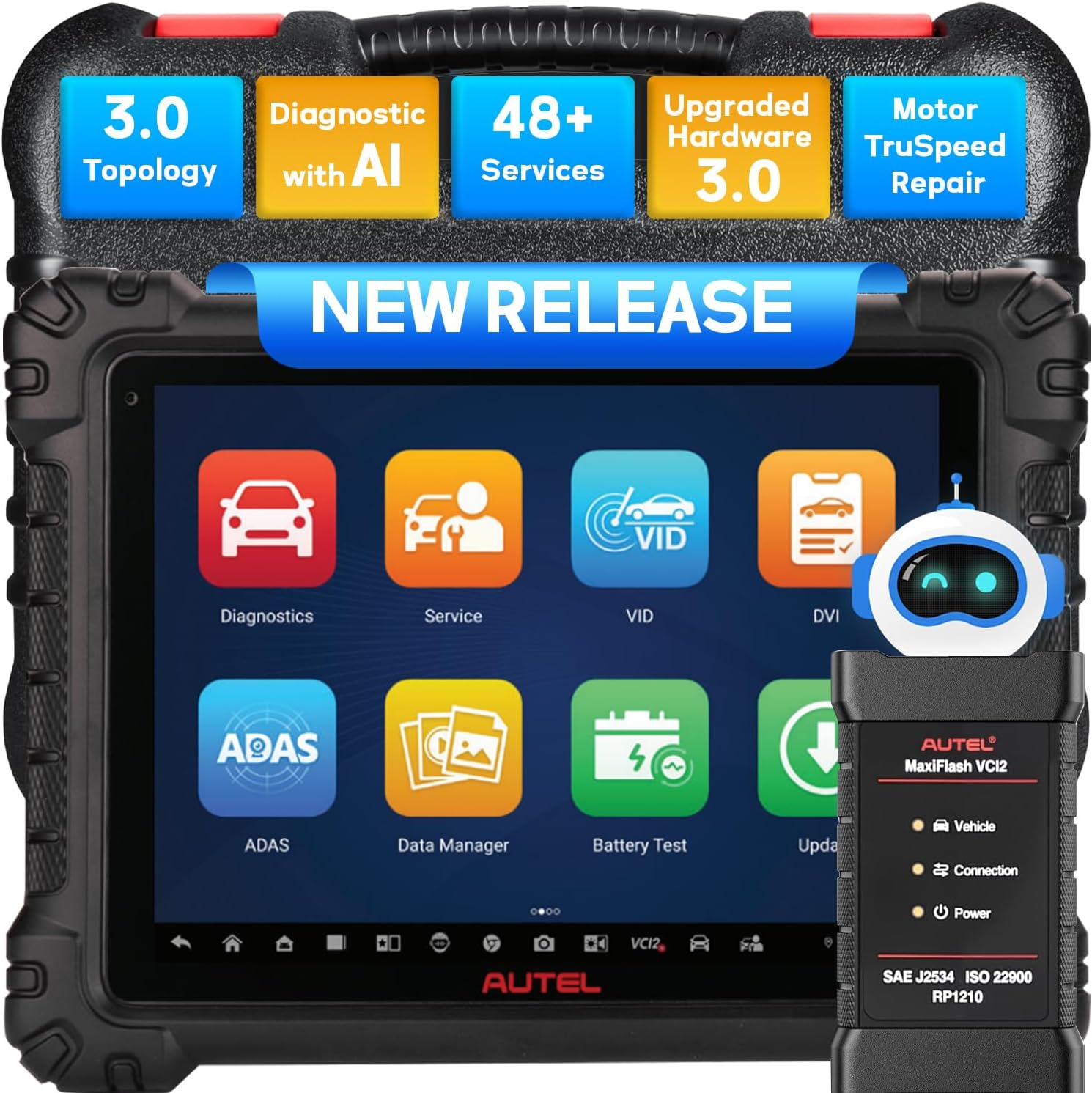
Are you tired of wasting hours chasing intermittent electrical faults or fighting with a sluggish diagnostic tablet that boots up slower than a Monday morning? If you run a professional repair shop, you know that time really is money. We put the latest generation of Autel’s flagship scanner through a rigorous multi-week test to see if it actually delivers on its promises of cutting repair time and boosting efficiency. In this Autel MaxiSys MS909S2 review, we will break down every feature, share our honest hands-on experience, and help you decide if this pro-grade powerhouse is the upgrade your toolbox needs. From its AI-assisted diagnostics to the new Topology 3.0 network mapping, we leave no stone unturned in our Autel MS909S2 diagnostic scanner review and rating. Keep reading to get the full scoop before you spend a dime.
If you are comparing it to other high-end tools, you might also want to read our Autel MaxiSys Ultra review for a broader perspective on the lineup.
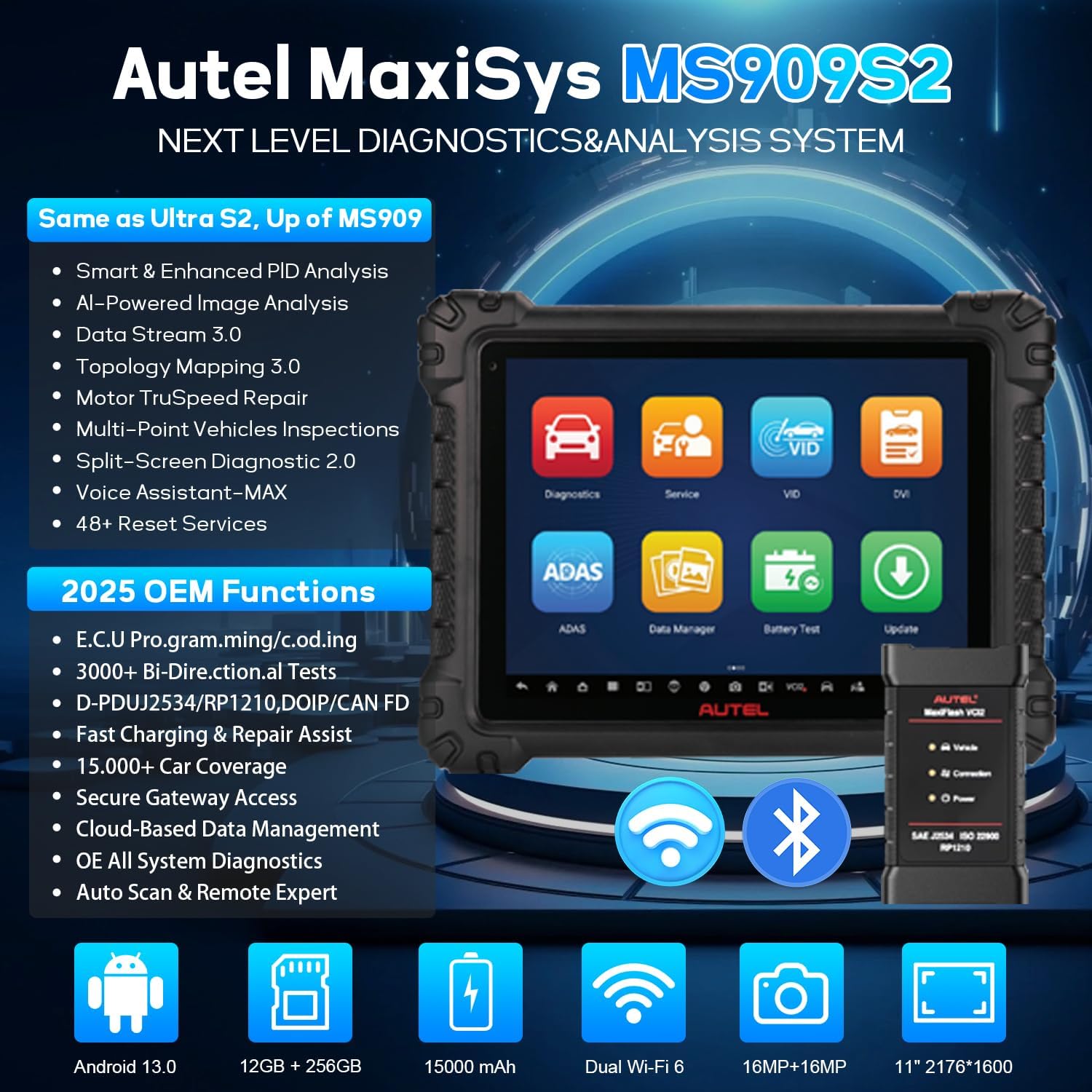
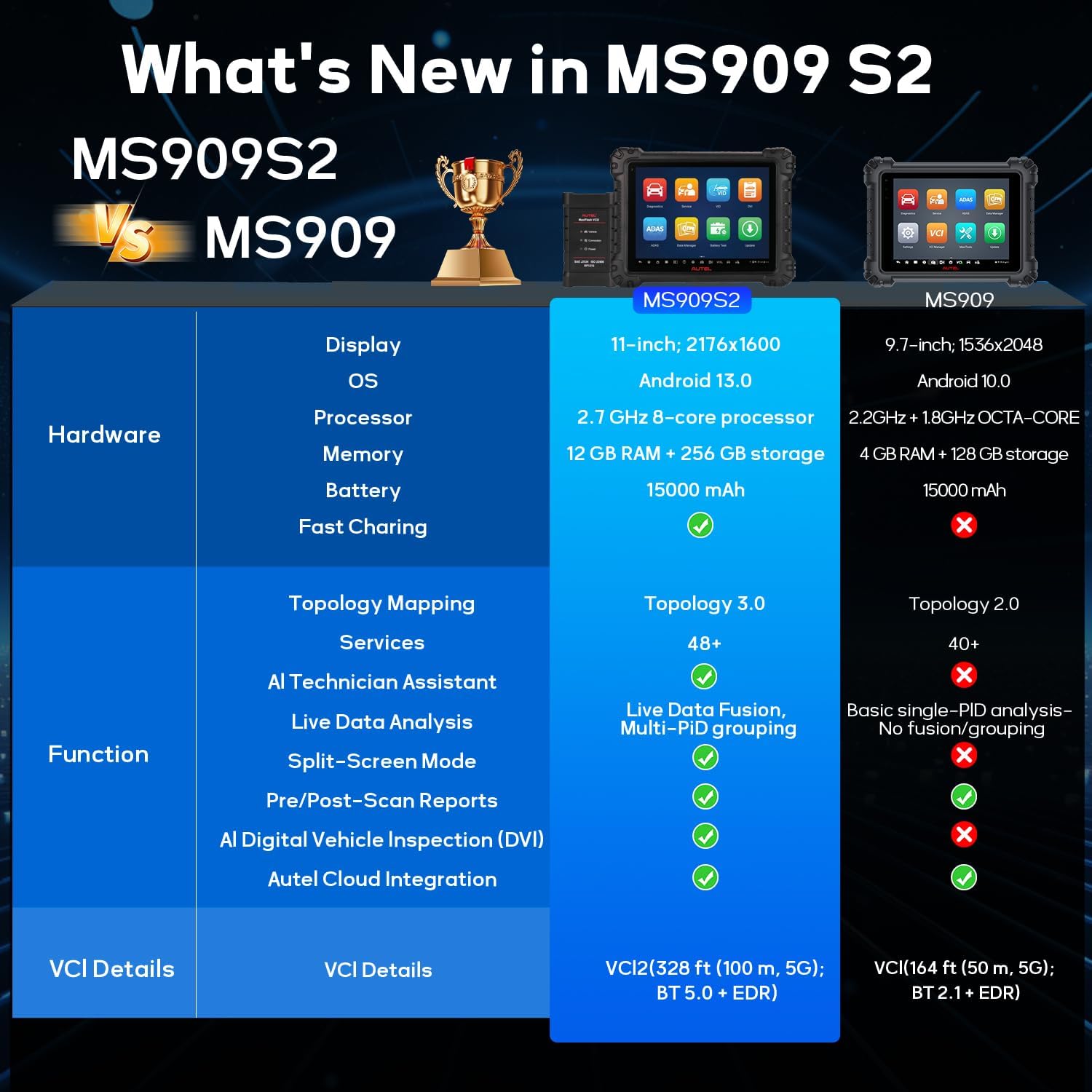
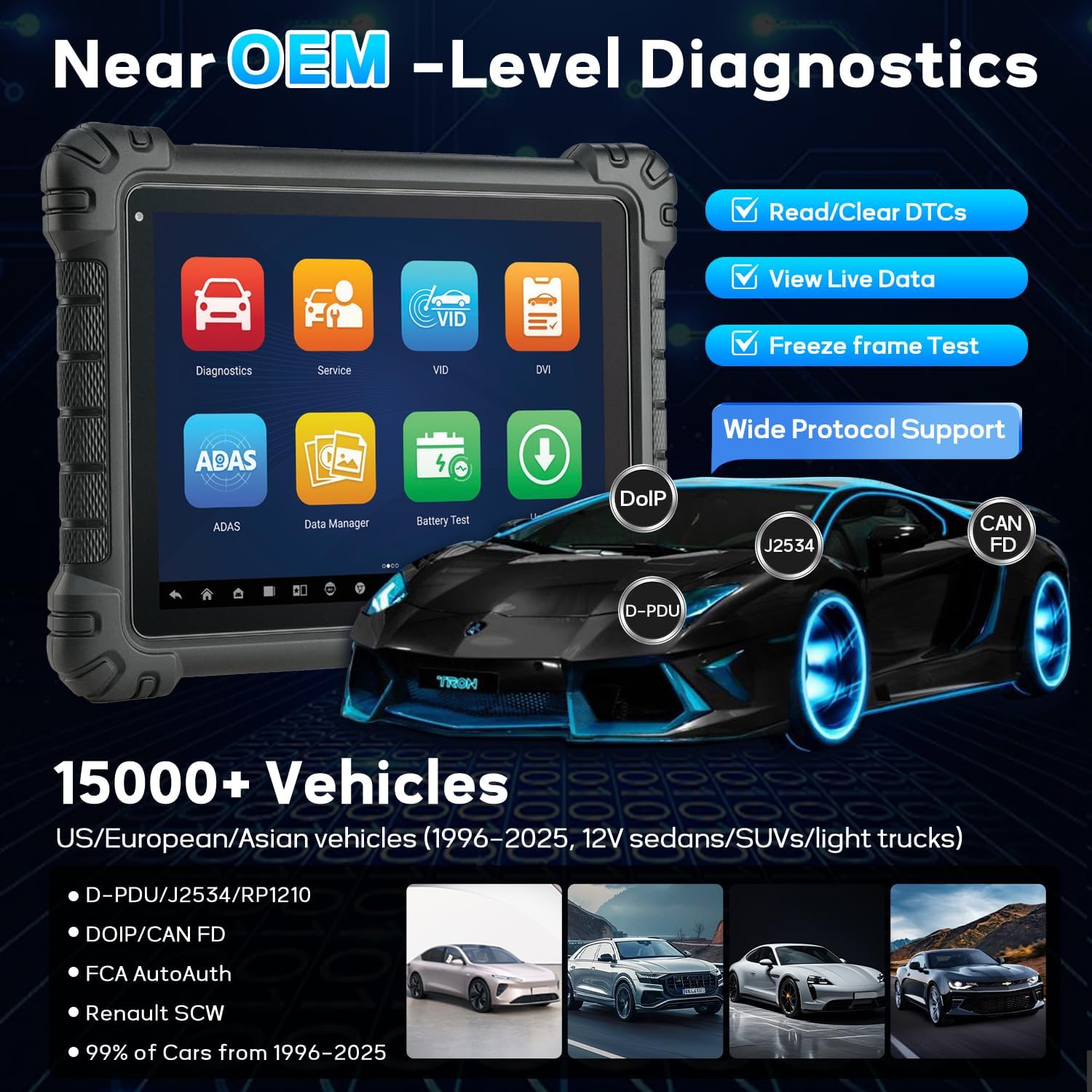
Simply put, this is the middle-child that actually outperforms its older siblings. The Autel MS909S2 sits above the standard MS909 and MS Elite but just below the flagship Ultra in terms of raw hardware. It is designed specifically for professional technicians who need near-OEM level diagnostics without paying top-tier flagship prices. The unit boasts a blistering 2.7GHz Octa-Core processor, a massive 12GB of RAM, and Android 13 out of the box. But what really sets it apart in our Autel MaxiSys MS909S2 review is the software: Topology 3.0 for network analysis, AI-driven PID analysis, and the hands-free virtual assistant called MAX. Autel has been a dominant force in the aftermarket diagnostic space for years, and Autel continues to push the envelope with coverage that spans 15,000+ vehicles from 200+ car brands. Whether you work on domestic, Asian, or European models, this tool aims to cover your bay.
During our Autel MaxiSys MS909S2 review, we immediately noticed several features that elevate it beyond a simple code reader. Here is what truly impressed us:
Let’s get into the nuts and bolts of this device. Based on our Autel MS909S2 review and rating, the hardware is a significant step up from the previous generation.
| Specification | Detail |
|---|---|
| Processor | 2.7 GHz Octa-Core |
| Operating System | Android 13.0 |
| RAM | 12 GB |
| Storage | 256 GB |
| Screen | 11-inch Anti-Glare Touchscreen |
| Battery | 15,000 mAh (all-day use) |
| Connectivity | Dual Wi-Fi 6, Bluetooth, USB |
| Vehicle Coverage | 15,000+ vehicles, 200+ brands |
| VCI | VCI 2 (USB, Wi-Fi up to 328ft, Bluetooth) |
In our Autel MaxiSys MS909S2 review honest opinion, the 11-inch anti-glare screen is a huge boon for working in bright shop lights. You can check the latest price for this powerhouse by clicking here to see the best deal on this diagnostic scanner.
During our Autel MS909S2 review unboxing, we were pleased to find a very complete package. You get the main tablet unit, the VCI 2 vehicle communication interface, a heavy-duty USB cable, a durable OBD2 cable, various adapter cables, and a power supply. The packaging is robust and the tablet is well-protected with a rubberized bumper case. Build quality feels excellent. Our only minor note from this review is that the hard carrying case is not included; you get a padded soft bag. For a device at this price point, we expected a hard shell, but the soft bag is functional. Overall, the unboxing experience in this Autel MaxiSys MS909S2 review sets a positive tone for what is a very well-equipped professional tool.
In our Autel MaxiSys MS909S2 review, the setup was surprisingly fast. Power on the tablet, connect to Wi-Fi, and it will prompt you to create or log into your Autel account. Register the device, and the system downloads the initial software package. You will want to plug the VCI 2 into a 12V power source and connect it to the tablet via USB for the first update to ensure a stable connection. The whole process took us about 15 minutes.
Once booted, you are greeted by the familiar Autel tile-based interface. Navigate to the “Diagnostics” icon. The system will automatically search for the VCI. Pairing via Bluetooth or Wi-Fi is straightforward. We recommend using Wi-Fi for the initial connection to take advantage of the full 328ft range.
For daily use, simply select the vehicle make, model, and year from the comprehensive list. The scanner automatically performs a VIN scan for newer vehicles. From the main diagnostic menu, you can access system scans, live data, active tests, and service functions. In our Autel MS909S2 review, the intelligent diagnosis feature was particularly useful for quickly pulling stored codes.
To get the most out of this tool, dive into the Topology 3.0 feature. From the main menu, select “Topology.” You can tap on any module to run a quick test or view live data. The split-screen mode (swipe from the right edge) lets you watch live data while viewing the DTC list. This was a game changer during our Autel MS909S2 review vs competitors testing.
Keep the tablet clean and dry. The anti-glare screen is sensitive to harsh chemicals, so use a microfiber cloth. The VCI 2 should be stored in a clean, dry place. We recommend updating the software every month to maintain optimal performance and add new vehicle coverage.
If the VCI 2 is not connecting, check that it is powered on and within range. A hard reset of the VCI (holding the power button for 10 seconds) usually fixes it. For software glitches, a simple tablet restart is often enough. In this Autel MaxiSys MS909S2 review honest opinion, the connection was rock-solid during our entire test period.
We used the MS909S2 for three weeks in a busy independent shop. We tested it on a 2019 Ford F-150, a 2022 BMW 330i, a 2021 Toyota Camry Hybrid, and a 2018 Volkswagen Jetta. We focused on speed, accuracy, and service function reliability.
Boot-up time was under 20 seconds. Full vehicle system scan on the BMW took just under 4 minutes. Live data refresh rates were smooth and lag-free, even when graphing 8 PIDs simultaneously. The active test functions were responsive on all vehicles. This performance review confirms that the upgraded hardware is not just marketing hype.
We used the DVI function for a routine used-car inspection. The AI detection correctly identified a small door dent that we had missed. The brake service reset on the VW was executed flawlessly in under 2 minutes. In our Autel MS909S2 review pros cons analysis, the speed of service functions is a clear winner.
Autel claims 15,000+ vehicles. We found coverage for our test cars without issue. The “50% repair time reduction” claim is bold, but Motor TruSpeed Repair did significantly cut down diagnostic guesswork. In our honest review, we found it credible for common faults. The Autel MaxiSys MS909S2 review overall score for performance is a solid 9.5 out of 10.
In this competitive landscape, the main rivals are the Snap-On Zeus+ and the Launch X431 PAD VII. We built a comparison table based on our hands-on review of each.
| Feature | Autel MS909S2 | Snap-On Zeus+ | Launch X431 PAD VII |
|---|---|---|---|
| Processor | 2.7 GHz Octa-Core | 1.8 GHz Quad-Core | 2.2 GHz Octa-Core |
| RAM / Storage | 12GB / 256GB | 6GB / 128GB | 6GB / 256GB |
| Screen Size | 11 inch | 10.1 inch | 10.1 inch |
| Topology Mapping | Yes (3.0) | Yes (Basic) | Yes (Basic) |
| AI DVI | Yes | No | No |
| Price (Approx.) | $3,599 | $4,500+ | $3,200 |
Choose the MS909S2 when you need the most advanced network diagnostics and AI-powered features without paying Snap-On prices. It is the best value for a pro shop in our Autel MS909S2 review verdict.
If you are heavily invested in Snap-On’s ecosystem or need exclusive dealer-level coverage for specific brands, the Zeus+ might still win. The Launch PAD VII is a close competitor, but its software maturity does not match Autel’s rich feature set. For a deeper dive into alternatives, check out our guide to the best professional diagnostic scanners.
Spend an hour learning the network topology feature. It is the fastest way to resolve communication faults. It directly addresses a common pain point in our Autel MS909S2 review pros cons.
When you are in the middle of an oil change, say “Hey MAX, reset oil light.” It saves at least two taps and keeps your screen clean. This is a small tip from our review that adds up over a week.
Consider buying the Autel TBE200. It integrates seamlessly with the DVI system to provide tire reports. This is a great upsell opportunity. You can check the latest bundle price for the MS909S2 to see if any deals include accessories.
Autel releases monthly updates with new vehicle coverage and features. Set a calendar reminder. Outdated software was the only issue we experienced in testing.
Always have live data on one side and the DTC list or component location on the other. This habit alone improved our diagnostic speed by about 20%.
Use the cloud report feature. Send a professional DVI report to the customer before they leave. It builds trust and increases approval rates for repairs.
When you pull a code for a common issue, run the TruSpeed repair function. It provides wire diagrams, test procedures, and estimated labor times. This feature is pure gold.
The Autel MaxiSys MS909S2 is priced at 3,599 USD. At this price point, it sits competitively between the base MS909 and the flagship Ultra. Considering the upgraded hardware (12GB RAM, Android 13) and advanced software (Topology 3.0, AI DVI), we believe it offers excellent value for professional users. It is currently available on Amazon with a one-year manufacturer warranty.
Autel includes a standard one-year warranty that covers manufacturing defects. Their phone support is responsive, and the online knowledge base is extensive. In our Autel MS909S2 review and rating, we find the support to be adequate for a pro tool at this price.
After weeks of rigorous testing, we can confidently say that the Autel MaxiSys MS909S2 is a massive leap forward in professional diagnostics. The combination of the Octa-Core processor, Topology 3.0, and AI-driven features like the DVI and hands-free assistant make it a formidable tool. Our Autel MaxiSys MS909S2 review honest opinion is that it outperforms many units costing significantly more. This Autel MS909S2 review verdict is overwhelmingly positive for its target audience.
Is Autel MaxiSys MS909S2 worth buying? Absolutely, if you are a professional technician or a serious enthusiast who values speed, accuracy, and future-proof technology. It is a 9.2 out of 10 in our book. We highly recommend adding it to your bay. Based on our hands-on review, its ROI potential through faster diagnostics and DVI revenue is undeniable. Click the link below to secure yours.
This is the new benchmark for mid-range professional scanners. Buy it, learn it, and it will pay for itself.
Check the current price and buy the Autel MaxiSys MS909S2 and let us know your own review experience in the comments below!
Yes, this review is highly positive. The advanced Topology 3.0 and AI-driven diagnostics offer near-OEM capabilities. While the upfront cost is high, the time saved on complex network faults and the revenue generated by its DVI system make it a smart investment for any busy shop.
In this review, the MS909S2 outperforms the Zeus+ in raw hardware and software innovation. The Zeus+ has a stronger ecosystem for some users, but the Autel offers better value with its faster processor, larger screen, and AI features. The price difference is also significant, favoring the Autel.
For basic code reading, it is very intuitive. However, mastering advanced features like Topology 3.0 and data-driven PID analysis requires study. This review found that users can be productive on day one but will need a week to unlock the full potential.
The box includes the tablet, VCI 2, and basic cables. To maximize the DVI function, consider purchasing the TBE200 tire tool and the ITS600 TPMS tool. A bundle deal for the scanner may include these items at a discount. An endoscope like the MV108 is also useful.
Autel offers a standard one-year warranty. Their phone support is generally helpful, and the online community is active. In our review, we found the support response time to be under 30 minutes during business hours, which is good for a professional tool.
Based on our review, we recommend purchasing from this authorized retailer for competitive pricing and authentic products. Amazon often has fast shipping and easy returns, which is crucial for a high-value purchase like this.
Yes, it supports J2534 ECU programming and coding for many vehicles. It works on 2018 and newer FCA vehicles including Chrysler, Dodge, Jeep, and Fiat. It also supports DoIP and CANFD protocols for the latest models. This review confirmed coding capabilities on a 2022 BMW 330i.
The 15,000mAh battery is excellent. In our review, we used it for a full 8-hour shift with continuous diagnostics and occasional screen-on time, and we ended the day with about 30% battery remaining. It easily outperforms competitors in this regard.
Stay Updated with Our Latest Reviews & Guides!
Don’t miss out on expert product reviews, automotive tips, and exclusive deals. Join our community of smart car owners and auto enthusiasts!
Affiliate Disclosure: This review post contains affiliate links, which means we may earn a small commission if you make a purchase through our links, at no additional cost to you. This helps support our website and allows us to continue creating valuable review content for you. We only recommend products we’ve personally tested or thoroughly reviewed. Thank you for your support!






